|
Where does text art come from? How did it develop and where was it used in the past and the present? What are the different styles that are used by text artists on modern computers? Find answers to those questions and more in the following articles.
What is the ASCII Art Academy?
I created the ASCII Art Academy to bring articles, tutorials and other text art related resources together into one place. The purpose of this ASCII academy is completely educational.
It is for people who want to learn more about the origin and use of this unique art form and artists who want to learn how to create this kind of art to carry forward the legacy of decades, if not centuries of other text artists before them.
You can also find many good examples of the various types of text art in the art galleries on this website. Tools for the creation of ANSI and ASCII text art are available for free download here.
What is ASCII Art?
ASCII stands for American Standard Code for Information Interchange and is a text format standard for computers. ASCII art is text art that was created on computers who use this ASCII standard. The text art created on the IBM PC, which use text characters beyond the ASCII standard are also called ASCII, even though it is technically incorrect. The IBM PC become the most widely used computer in the world and people called things ASCII, even if they were not. There is no sense to debate about it, because it won't change what already happened.
7-Bit ASCII?
The difference between 7-bit and 8-bit ASCII is pretty simple,
assuming that you have a keyboard with the latin alphabet. 7-bit only uses characters that you can find on the keyboard. 8-bit uses additional characters that you cannot find on your keyboard, but which exist in "text mode" of the old MS DOS operating system. MS DOS hat 256 characters for text mode. Some of them are control chracters and not visible, such as Carriage Return, Line Feed (Line Break), the Tab character or the Escape character.
The standard US-ASCII characters are the first 128 chracters of the character set, where 97 of them are usable for text and ASCII art.
Here is the US-ASCII Character Set, starting with the ASCII character 32 (space/blank) and ending with the ASCII character #126 (tilde: ~). The space character is represented by the white block at the beginning.
         █ ! " # $ % & ' ( ) * + , - . / 0 1 2 3 4 5 6 7 8 9 : ; < = > ?
         @ A B C D E F G H I J K L M N O P Q R S T U V W X Y Z [ \ ] ^ _
         ` a b c d e f g h i j k l m n o p q r s t u v w x y z { | } ~
The characters 0 to 31 and 127, which are also part of the US-ASCII character set (which can be represented in 7 bits) are invisible and not suitable for text art. The exception might be the line break (carriage return [character 13]) and line feed (character 10) characters, which are of course used within a text document.
8-Bit ASCII/High ASCII/Block ASCII
8-bit ASCII art uses primarily characters after the 128 chracters of the
US-ASCII character set. If you are from a non-English speaking country, some of those characters might be on your keyboard, such as the german characters ä, ö, ö, Ä, Ö, Ü and ß, but that are not the special extended characters relevant for what we call "Block" or "High" ASCII Art.
Those upper or "higher" characters are suitable for basic graphical elements, such as box borders, corners. They are unique to the IBM PC and MS DOS and are not compatible with other operating systems, such as UNIX, Linux or MAC OS.
Here are some examples of those graphical characters. It is not a complete list, but includes the most popular and the ones most frequently used by artists.
░ ▒ ▓ █ ▀ ▄ ▌ ▐ ■ ▪ ┌ ┐ └ ┘ ─ │ ├ ┥ ┴ ┯ ╞ ╟ ╚ ╔ ╩ ╦ ╠ ═ ╬
You cannot find those characters on your keyboard and could only generate them via programming code or by pressing the ALT-Key and then type the character code (a number between 128 and 255) on your numeric keypad, while keeping the ALT-Key pressed.
Artists utilize special editors created for the sole purpose of creating text art using those special characters, tools like TheDraw or ACiDDraw for MS DOS or Pablodraw for Windows.
ANSI
The Name "ANSI" is derived from the MS.DOS system driver "ANSI.SYS",
which implemented the ANSI Standard X3.64-1979 "Additional Controls for Use with the American National Standard Code for Information Interchange" for MS DOS by Microsoft on IBM Personal Computers.
The standard defines a set of control sequences to manipulate the appearance of the text on the screen, to bolden text, making it itallic or blinking and to add some colors to your text.
Although ANSI as artform was primarily exercised on IBM PC's running MS DOS or compatible operating systems, it's not entirely limited to that.
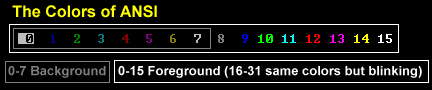
There are 16 pre-defined foreground colors, where 8 of them could also be used as background color.
For a comprehensive technical documentation of ANSI.SYS, check out my ANSI.SYS Documentation.
The use of ANSI control sequences (called Escape sequences, because they all started with the ESC character) required special editing software, because unlike the 8-Bit upper characters, is there no easy way to generate those sequences by hand. In order for MS DOS to process and interpret those control sequences properly, a special driver had to be loaded, which came with the MS DOS operating system by default.
The file for this driver was named "ANSI.SYS". This is where ANSI got it's name from, which can be confusing sometimes, because "ANSI" also stands for the American National Standards Institute, the organization who defined the US-ASCII standard.
ANSI Colors mapped to HTML color codes and ESC Sequence:
| # |
Color Name |
HTML Hex |
R,G,B |
ESC |
# |
Color Name |
HTML Hex |
R,G,B |
ESC |
| 00 |
Black |
#000000 |
0, 0, 0 |
 [0;30m [0;30m |
01 |
Dark Blue |
#0000AA |
0, 0, 170 |
[0;34m |
| 02 |
Dark Green |
#00AA00 |
0, 170, 0 |
[0;32m |
03 |
Dark Cyan |
#00AAAA |
0, 170, 170 |
[0;36m |
| 04 |
Dark Red |
#AA0000 |
170, 0, 0 |
[0;31m |
05 |
Purple/Dark Magenta |
#AA00AA |
170, 0, 170 |
[0;35m |
| 06 |
Brown |
#AA5500 |
170, 85, 0 |
[0;33m |
07 |
Gray |
#AAAAAA |
170, 170, 170 |
[0;37m |
| 08 |
Dark Gray |
#555555 |
85, 85, 85 |
[1;30m |
09 |
Blue |
#5555FF |
85, 85, 255 |
[1;34m |
| 10 |
Green |
#55FF55 |
85, 255, 85 |
[1;32m |
11 |
Cyan |
#55FFFF |
85, 255, 255 |
[1;36m |
| 12 |
Red |
#FF5555 |
255, 85, 85 |
[1;31m |
13 |
Light Purple/Magenta |
#FF55FF |
255, 85, 255 |
[1;35m |
| 14 |
Yellow |
#FFFF55 |
255, 255, 85 |
[1;33m |
15 |
White |
#FFFFFF |
255, 255, 255 |
[1;37m |
Note: The for the ESC sequence must be replaced with the ASCII character for "Escape" (Chr(27)).
|


 Joan's and RaD Man's article and video both talk about the pre-computer text art in greater detail. Although the articles below are focusing heavily on the


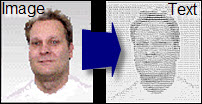 This popularity today is also the reason, why I mention them here, because regardless if I like it or not, they have their place in ANSI and ASCII art history. Even though the converter tools became more sophisticated and can produce good to excellent results today, is their use among serious text artists against the ethics and rules as it was during the prime of computer text art.
 MagicSoft Img2ASCII-ANSI